Lucene技术调研

Lucene简介

Lucene是一个基于Java的全文信息检索工具包,它不是一个完整的搜索应用程序,而是为你的应用程序提供索引和搜索功能。Lucene目前是Apache Jakarta家族中的一个开源项目。也是目前最为流行的基于Java开源全文检索工具包。

Lucene最初是由Doug Cutting所撰写的,他是一位资深的全文索引及检索专家,曾经是V-Twin搜索引擎的主要开发者,后来在Excite担任高级系统架构设计师,目前从事于一些互联网底层架构的研究。他贡献出Lucene的目标是为各种中小型应用程序加入全文检索功能。

备注:综合来说,Lucene工具包完成了索引Index和搜索Search两个功能。

Lucene工具包的使用

Lucene能够为文本类型的数据建立索引,所以你只要能把你要索引的数据格式转换为文本格式的,Lucene就能对你的文档进行索引和搜索。比如你要对一些HTML文档、PDF文档进行索引的话你就首先需要把HTML文档和PDF文档转化成文本格式的,然后将转化后的内容交给Lucene进行索引,然后把创建好的索引文件保存到磁盘或者内存中,最后根据用户输入的查询条件在索引文件上进行查询。

如下为应用程序和Lucene工具包的关系图:
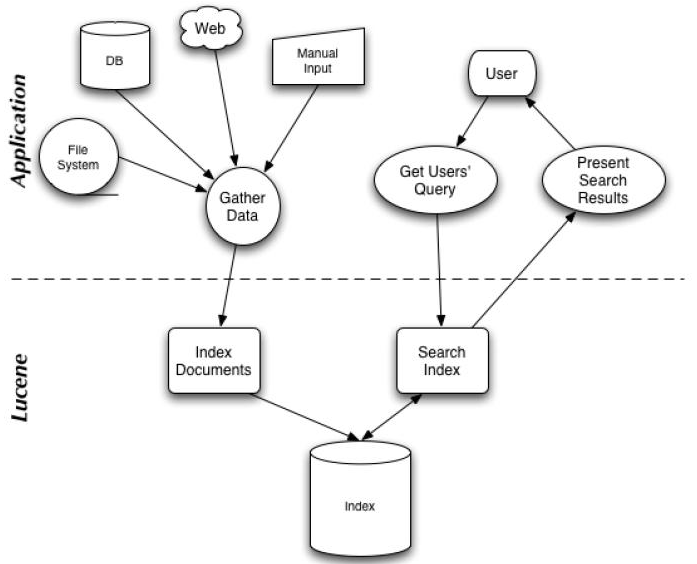
Lucene索引原理

Lucene建索引时,使用的是倒排索引(inverted index)的结构。倒排索引维护了一个词/短语表,对于这个表中的每个词/短语,都有一个链表描述了有哪些文档包含了这个词/短语。这样在用户输入查询条件的时候,就能非常快的得到搜索结果。

Lucene开发包介绍

Lucene软件包的发布形式是一个JAR文件,如下为这个JAR文件中主要的package:

(1)Package: org.apache.lucene.document

这个包提供了一些为封装要索引的文档所需要的类,比如Document、Field等。这样,每一个文档最终被封装成了一个Document对象。

(2)Package: org.apache.lucene.analysis

这个包主要功能是对文档进行分词,因为文档在建立索引之前必须要进行分词,所以这个包的作用可以看成是为建立索引做准备工作。

(3)Package: org.apache.lucene.index

这个包提供了一些类来协助创建索引以及对创建好的索引进行更新。这里面有两个基础的类:IndexWriter和IndexReader,其中IndexWriter是用来创建索引并添加文档到索引中的,IndexReader是用来删除索引中的文档的。

(4)Package: org.apache.lucene.search

这个包提供了对在建立好的索引上进行搜索所需要的类。比如IndexSearcher和Hits,IndexSearcher定义了在指定的索引上进行搜索的方法,Hits用来保存搜索得到的结果。

基于Lucene工具包的开发DEMO

(1)为计算机中指定的磁盘目录中的所有文件建立索引,然后将新建的索引文件写到磁盘上

1
2
3
4
5
6
7
8
9
10
11
12
13
14
15
16
17
18
19
20
21
22
23
24
25
26
27
28
29
30
31
32
33
34
35
36
37
38
39
40
41
42
43
44
45
46
package TestLucene;
import java.io.File;
import java.io.FileReader;
import java.io.Reader;
import java.util.Date;
import org.apache.lucene.analysis.Analyzer;
import org.apache.lucene.analysis.standard.StandardAnalyzer;
import org.apache.lucene.document.Document;
import org.apache.lucene.document.Field;
import org.apache.lucene.index.IndexWriter;
/**
* This class demonstrate the process of creating index with Lucene
* for text files
*/
public class TxtFileIndexer {
public static void main(String[] args) throws Exception {
//indexDir is the directory that hosts Lucene's index files
File indexDir = new File("D:\\luceneIndex");

//dataDir is the directory that hosts the text files that to be indexed
File dataDir = new File("D:\\luceneData");
Analyzer luceneAnalyzer = new StandardAnalyzer();
File[] dataFiles = dataDir.listFiles();
IndexWriter indexWriter = new IndexWriter(indexDir, luceneAnalyzer, true);
long startTime = new Date().getTime();

for(int i = 0; i < dataFiles.length; i++) {
if(dataFiles[i].isFile() && dataFiles[i].getName().endsWith(".txt")) {
System.out.println("Indexing file " + dataFiles[i].getCanonicalPath());
Document document = new Document();
Reader txtReader = new FileReader(dataFiles[i]);
document.add(Field.Text("path", dataFiles[i].getCanonicalPath()));
document.add(Field.Text("contents", txtReader));
indexWriter.addDocument(document);
}
}

indexWriter.optimize();
indexWriter.close();
long endTime = new Date().getTime();

System.out.println("It takes " + (endTime - startTime)
+ " milliseconds to create index for the files in directory "
+ dataDir.getPath());
}
}

(2)基于(1)中建立的索引,来搜索包含指定关键词的文档

1
2
3
4
5
6
7
8
9
10
11
12
13
14
15
16
17
18
19
20
21
22
23
24
25
26
27
28
29
30
31
32
33
34
35
package TestLucene;
import java.io.File;
import org.apache.lucene.document.Document;
import org.apache.lucene.index.Term;
import org.apache.lucene.search.Hits;
import org.apache.lucene.search.IndexSearcher;
import org.apache.lucene.search.TermQuery;
import org.apache.lucene.store.FSDirectory;
/**
* This class is used to demonstrate the
* process of searching on an existing
* Lucene index
*/
public class TxtFileSearcher {
public static void main(String[] args) throws Exception {
String queryStr = "lucene";

//This is the directory that hosts the Lucene index
File indexDir = new File("D:\\luceneIndex");
FSDirectory directory = FSDirectory.getDirectory(indexDir, false);
IndexSearcher searcher = new IndexSearcher(directory);
if(!indexDir.exists()) {
System.out.println("The Lucene index is not exist");
return;
}

Term term = new Term("contents", queryStr.toLowerCase());
TermQuery luceneQuery = new TermQuery(term);
Hits hits = searcher.search(luceneQuery);
for(int i = 0; i < hits.length(); i++) {
Document document = hits.doc(i);
System.out.println("File: " + document.get("path"));
}
}
}

学习资料参考于:
https://www.ibm.com/developerworks/cn/java/j-lo-lucene1/